
SASSA Appeal Form for SRD R370 Grant: Complete Online Submission Guide
If you’re searching for a downloadable “SASSA appeal form“ to print, fill in, and submit, here’s the most important thing to know upfront: there isn’t one. The SRD appeal process is entirely electronic, submitted through SASSA’s official online platform rather than a paper or PDF form.
This trips up a lot of applicants who expect a printable document the way you’d expect for, say, a bank form or a Home Affairs application.
There Is No Printable SASSA Appeal Form Here’s What Exists Instead
Unlike some government processes that use a paper form with a reference number in the corner, the SASSA SRD appeal is submitted through the DSD Appeal Electronic Platform at srd.sassa.gov.za/appeals. This is the official “form” a web-based application that captures the same information a paper form would, but does so online, with identity verification built in.
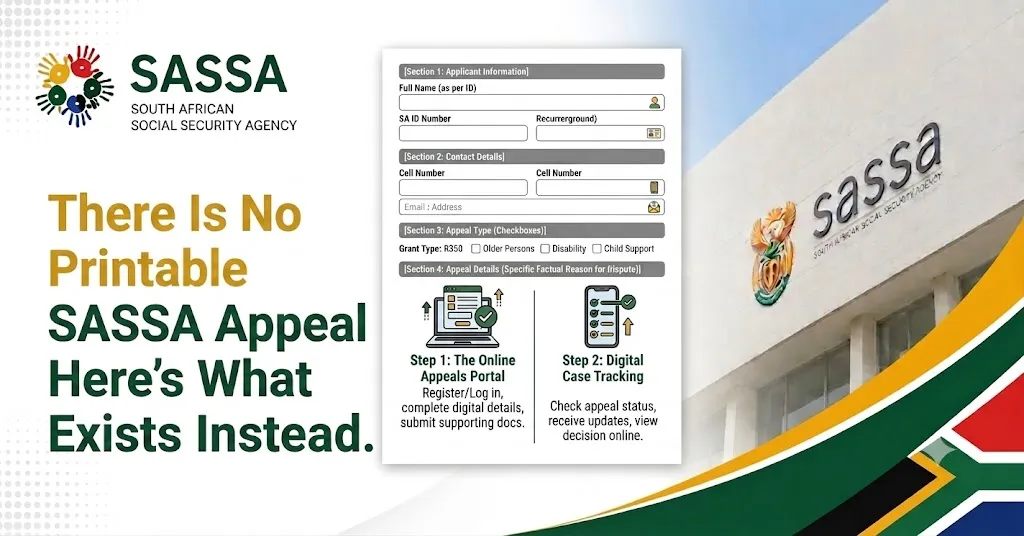
Why it’s designed this way: an electronic form allows SASSA to instantly verify your ID number and cellphone number against existing records, attach supporting documents digitally, and route your case straight to the Independent Tribunal for Social Assistance Appeals (ITSAA) without manual data capture delays.
If you don’t have reliable internet access, the same information can be captured on your behalf at a SASSA office but even there, staff enter it into the same electronic system rather than filing a paper form.
Be cautious of any site offering a downloadable “SASSA appeal form PDF” this isn’t how the official process works, and such sites are a common vector for scams targeting people searching for SRD help.
Who Can Use the SASSA Appeal Form
The appeal form applies to anyone whose SRD R370 application was R350 declined for a specific month and who believes the decision was incorrect. This most commonly applies to unemployed applicants the SRD grant’s core requirement who were flagged incorrectly for reasons like:
If you’re unemployed and were declined because SASSA’s system incorrectly linked you to income, employment, or another grant, the appeal form is the correct route not a fresh application, which restarts your case rather than protecting the specific declined month.
Step-by-Step: Completing the Online Appeal Form
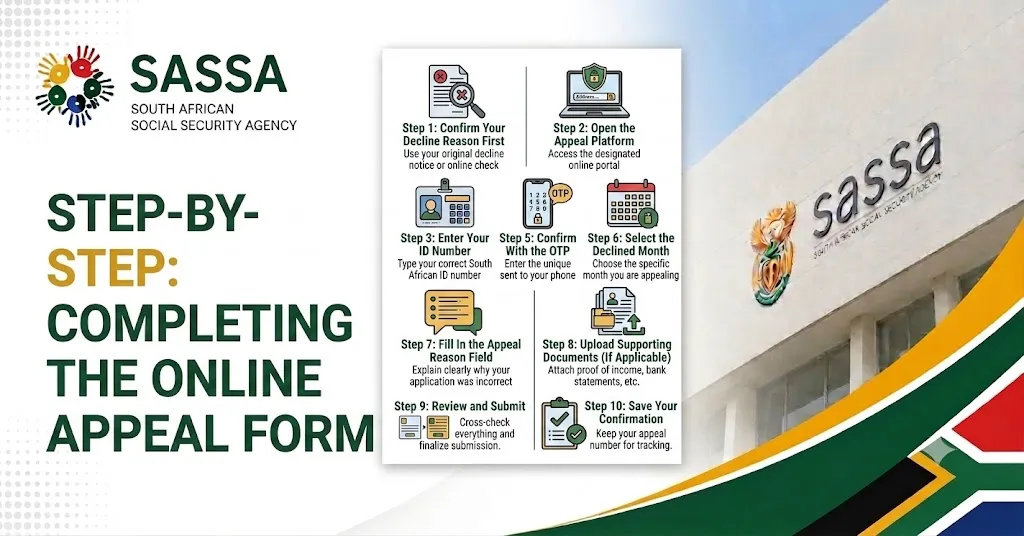
Step 1: Confirm Your Decline Reason First
Before opening the appeal form, log in to srd.sassa.gov.za with your ID number and registered cellphone number, and check the specific decline reason shown on your status page. This determines what you’ll write in the form.
Step 2: Open the Appeal Platform
Go to srd.sassa.gov.za/appeals. This is the only official link for the appeal form bookmark it directly rather than searching for it each time.
Step 3: Enter Your ID Number
The form asks for your 13-digit South African ID number. This must match exactly what you used on your original SRD application, including any leading digits.
Step 4: Enter Your Registered Cellphone Number
Use the number linked to your original application. If this number is no longer active, you’ll need to update it through the official number-change process before the appeal form will let you proceed, since OTP verification depends on it.
Step 5: Confirm With the OTP
An OTP is sent by SMS to verify your identity before the form loads your application details.
Step 6: Select the Declined Month
Choose the exact month you’re appealing from a dropdown or list. If more than one month was declined, you’ll complete this step separately for each month.
Step 7: Fill In the Appeal Reason Field
This is the most important part of the form a short written explanation of why you believe the decline was incorrect. More detail below on what makes this section strong.
Step 8: Upload Supporting Documents (If Applicable)
Attach any evidence relevant to your specific decline reason a UIF letter, bank statement, or corrected ID document.
Step 9: Review and Submit
Double-check every field before submitting the ID number, cellphone number, selected month, and reason should all match your actual situation exactly.
Step 10: Save Your Confirmation
Once submitted, you’ll receive an on-screen confirmation and reference number. Screenshot or write this down you’ll need it to check your appeal status later.
What Each Field on the Appeal Form Actually Asks For
What to Write in the Appeal Reason Field
The single biggest factor in how quickly and successfully your appeal is processed is how specific and factual your reason is. Compare these two approaches:
Weak: “Please I need this grant, I have no other income, please help me.”
Strong: “I was declined for UIF Registered, but my UIF benefits ended on [date]. I have attached my UIF payment history confirming no payments were received during the declined month.”
The strong version directly addresses the decline code, states a specific fact, and references an attached document. This gives the tribunal exactly what it needs to review your case quickly, rather than requiring back-and-forth clarification.
Why this matters: ITSAA reviews cases at scale, and a reason that maps precisely to the decline code is far easier to process than a general statement, even if both are equally true.
Supporting Documents You Can Attach
Label your files clearly before uploading something like “UIF_Letter_Jan2026” rather than a generic scan name so reviewers can identify each document without confusion.
Comparison Table: Appeal Form vs. Reapplication Form
| Feature | Appeal Form | Reapplication Form |
| Format | Online only (srd.sassa.gov.za/appeals) | Online only (srd.sassa.gov.za) |
| Covers | One specific declined month | Going forward, from submission date |
| Reviewed by | ITSAA (independent tribunal) | SASSA (same system) |
| Best for | Believing a decline was wrong | Details have genuinely changed |
| Deadline | 30–90 days from decline date | No fixed deadline |
| Can back-pay missed month? | Yes, if approved | Generally no |
So, the appeal form is the right choice specifically when you believe a declined month was a mistake and want that month protected, while the reapplication form suits situations where your circumstances or details have actually changed since you last applied.
Common Mistakes When Completing the Appeal Form
Tips for Getting the Form Right the First Time

Thabo Nkosi (Founder, Social Security Advisor and Content Writer)
Thabo Nkosi is a social security advisor and writer specializing in South African SASSA grants and appeals procedures. He was born and raised in South Africa and has spent over a decade helping individuals and families navigate the South African social welfare system.
His experience as a social security advisor gave him in-depth knowledge of the SASSA grant system, the procedures before SASSA, the Department of Social Development, and everything related to the SASSA Appeal Tribunal and the Unique Beneficiary Reference Number.
FAQs
Final Thoughts
The “SASSA appeal form” isn’t a document you print and sign it’s the online application at srd.sassa.gov.za/appeals, and treating it that way from the start saves a lot of confused searching for a PDF that doesn’t exist. What actually determines whether your appeal succeeds isn’t the form’s format, but how precisely your reason and supporting documents match the specific decline code on your status page.
I really suggest checking your decline reason first, writing a reason that speaks directly to it, and attaching whatever proof you can before submitting that combination consistently gets appeals through the independent tribunal faster than a vague, undocumented submission ever will.